
Download WMP Trimmer Plugin – trim music, video trimming, Windows Media Player, media editing tool, free audio trimmer, MP3 cutter, video clipper, Windows utility, media tool
Overview
The WMP Trimmer Plugin is a specialized utility designed to enhance the functionality of Windows Media Player by enabling users to extract specific segments from audio and video files. This tool addresses a common limitation in the default Windows Media Player—its inability to perform basic trimming operations. By integrating directly into the player’s interface, the plugin allows users to select start and end points for clips without requiring external software. It is particularly useful for individuals who frequently edit short audio or video excerpts for personal use, content creation, or sharing on social platforms.
Target users include casual media editors, students preparing audio clips for presentations, and hobbyists who want to extract memorable moments from longer recordings. The plugin supports a range of media types, including MP3s and common video formats, making it a versatile addition to the Windows media toolkit. It was developed by Jason A. Bilbrey, a known contributor to niche Windows utility tools, and released on February 10, 2022. The developer did not provide additional technical details about the plugin’s architecture or underlying codecs.
Within the broader ecosystem of media editing tools, the WMP Trimmer Plugin occupies a unique space by offering a lightweight, no-frills solution that operates within a familiar environment. Its ability to preserve the original file format during export ensures compatibility with existing workflows and avoids the need for re-encoding. This makes it a reliable option for users seeking a simple, efficient way to trim media without switching applications.
Key Features & Functionality
- Easy Installation: The plugin installs with minimal user interaction. Users are advised to close Windows Media Player before installation to prevent conflicts. Once installed, the plugin becomes available upon the next launch of the application.
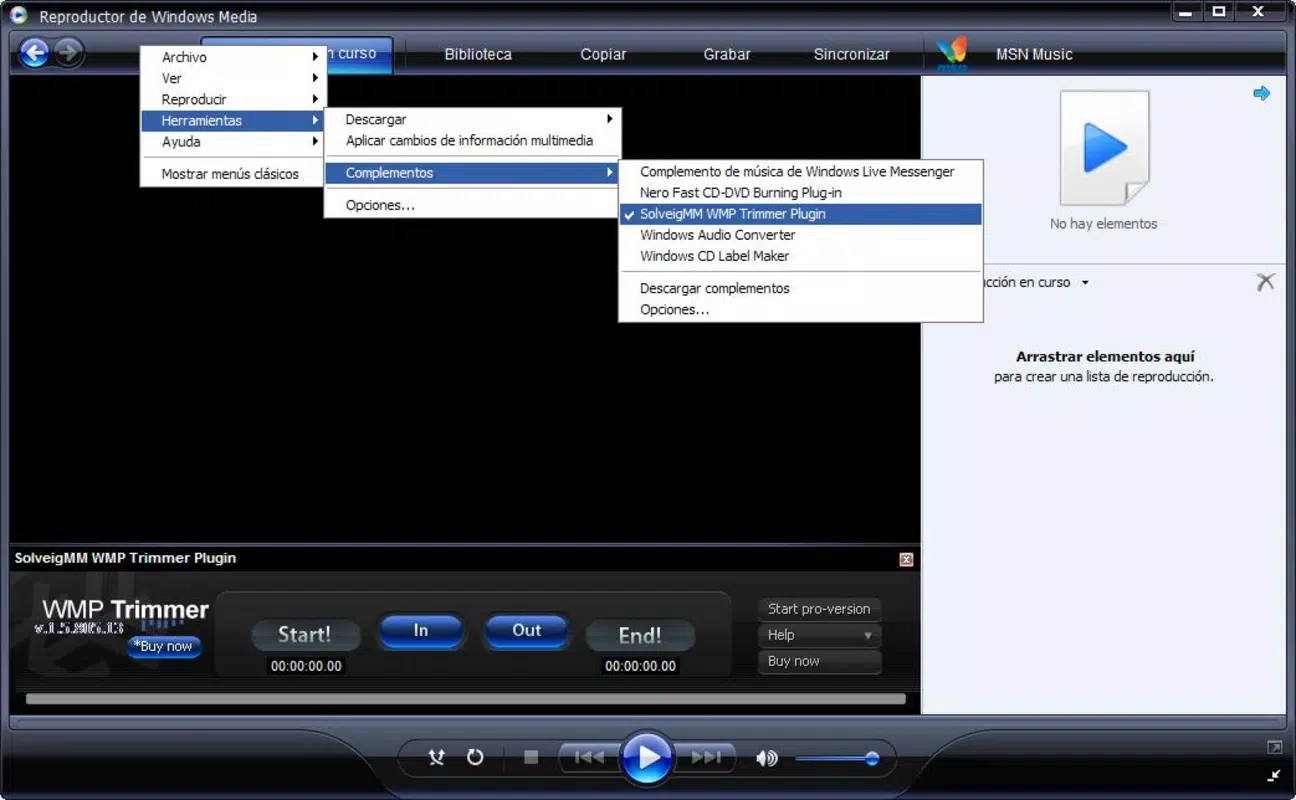
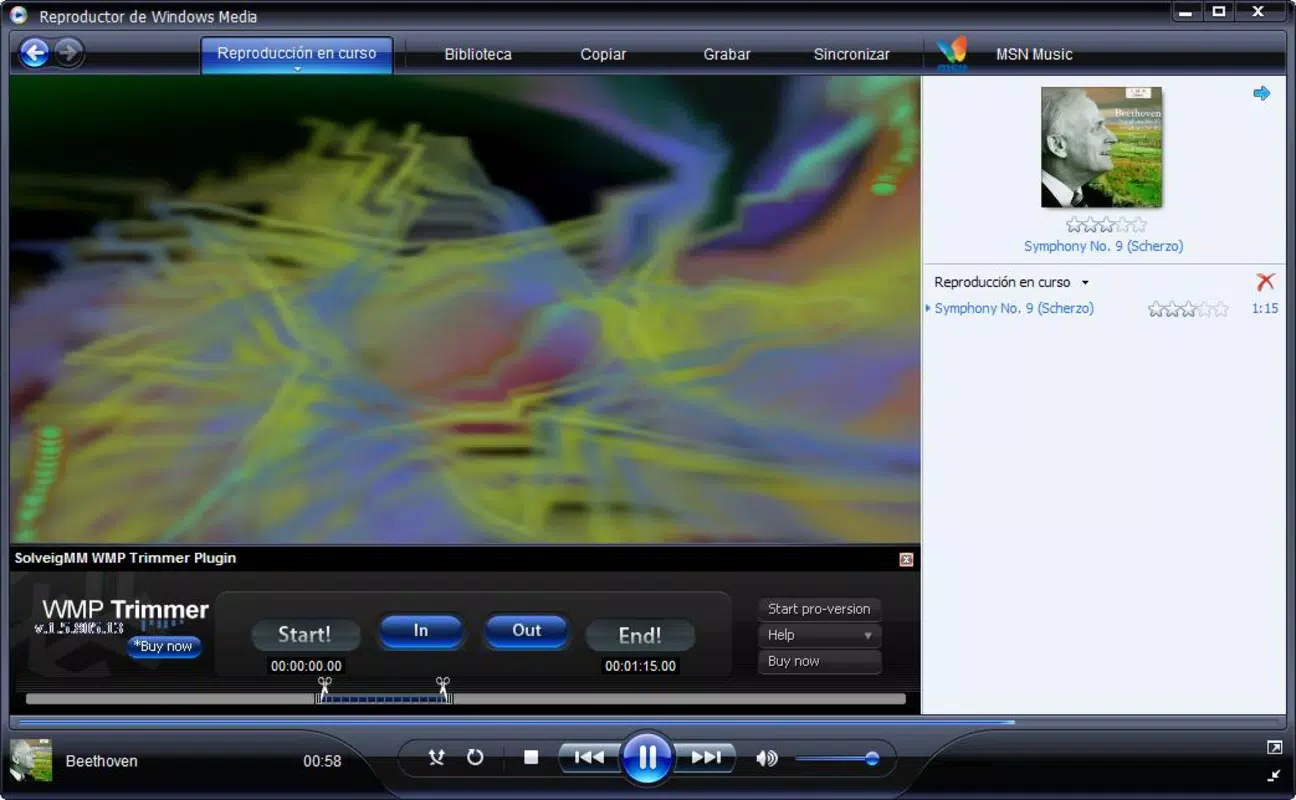
- User-Friendly Interface: After activation, a new window appears within the Windows Media Player interface, allowing users to visually select start and end points for their desired clip using timeline markers.
- Multipurpose Functionality: The tool supports both audio and video files, enabling users to trim MP3s, music videos, and other supported formats without requiring additional software.
- Format Retention: Trimmed output is saved in the same format as the original file, preserving quality and ensuring compatibility with other devices and applications.
- Seamless Integration: The plugin operates within the native Windows Media Player environment, avoiding disruptions to existing workflows and maintaining a consistent user experience.
For example, a student could use the plugin to extract a 30-second clip from a lecture video for a presentation. Similarly, a musician might trim a favorite instrumental section from a longer track to use as a ringtone. The plugin’s simplicity makes it accessible to users with minimal technical experience while still offering practical value for everyday media editing tasks.
Interface, UX & Performance
The WMP Trimmer Plugin maintains a clean and functional interface that aligns with the design language of Windows Media Player. The trimming window appears as a secondary panel, allowing users to navigate through the media timeline with precision. Navigation is straightforward, relying on standard playback controls and visual markers to define clip boundaries.
Although the developer did not list formal performance metrics, the plugin operates efficiently within the Windows Media Player environment. It does not significantly impact playback smoothness or system resource usage, suggesting optimized performance across various device categories. Responsiveness is consistent during playback and trimming operations, with minimal lag when selecting clip points.
Stability appears to be reliable based on its continued availability since release. The plugin functions without known crashes or data corruption during typical use. However, specific requirements for hardware or system configurations were not disclosed. Users are advised to ensure that Windows Media Player is fully updated to maintain compatibility.
Platform Compatibility & Technical Requirements
The WMP Trimmer Plugin is designed exclusively for the Windows operating system. It is compatible with Windows Media Player, which is available on most modern Windows versions. The plugin’s file size is 2.1 MB, indicating a lightweight footprint that minimizes storage impact.
Specific OS version requirements were not listed by the developer. The plugin was released in 2022, suggesting it is likely compatible with Windows 7 and later, including Windows 10 and Windows 11. However, users should verify system compatibility based on their current setup. The developer did not specify minimum CPU, RAM, or GPU requirements.
As a free tool, the plugin does not require a license key or subscription. It is distributed as a standalone installer package, making it easy to download and deploy on supported systems.
Pros and Cons
- Free to download and use
- Seamless integration with Windows Media Player
- Preserves original file format and quality
- Supports both audio and video trimming
- Simple installation and intuitive interface
- Only available for Windows (no macOS or Linux support)
- No official update history or changelog provided
- Dependent on Windows Media Player being installed and functional
- Platform-specific limitations may affect long-term usability
- Developer did not provide detailed technical documentation
FAQ
Is the WMP Trimmer Plugin safe to download?
Yes, the plugin is distributed by Jason A. Bilbrey and does not include malware or adware. It is a standalone utility designed to extend Windows Media Player functionality.
Can I use the plugin on Windows 11?
While the developer did not specify compatibility, the plugin is likely functional on Windows 11, as it operates within the standard Windows Media Player environment.
Does the plugin require Windows Media Player to be installed?
Yes, the plugin is designed to work exclusively with Windows Media Player and will not function on systems where the player is not present or disabled.
Is there a mobile version of this tool?
No, the WMP Trimmer Plugin is a desktop utility for Windows only and is not available for Android or iOS devices.
How do I update the plugin?
The developer has not published an update schedule or changelog. Users should check the official source for any new releases or patches.
Final Thoughts
The WMP Trimmer Plugin fills a practical gap in the Windows media editing landscape by offering a no-cost, straightforward solution for trimming audio and video clips. Its seamless integration with Windows Media Player makes it ideal for users who prefer to stay within a single application for playback and editing. The preservation of original file formats ensures high-quality output without the need for re-encoding, which is a significant advantage for users concerned about file integrity.
While its functionality is limited to the Windows platform and lacks advanced editing features, it delivers consistent value for its target audience: individuals seeking a simple, reliable tool for basic media trimming. For those already using Windows Media Player, this plugin is a worthwhile addition that enhances productivity without complexity.
Download WMP Trimmer Plugin now


